
In today’s business, a number of different companies have shifted from web hosting to cloud computing, and for good reason. This makes understanding the ecosystem outside coding quite important. So much so that it can make all the difference between becoming a junior or senior software engineer.
As Amazon Web Services is one of the most used cloud computing systems worldwide today, that is where you should focus on sharpening your skills. While there are many levels and designations you can work on, Data Analytics is a job role that is highly revered in the industry.
As a data analyst, you should master building data lakes on AWS which are secure and sound. This article is for anyone who aspires to become a data analyst on AWS but does not know where to start. You will get all the intricate details about the same and the step-wise process.
What Is A Data Lake?
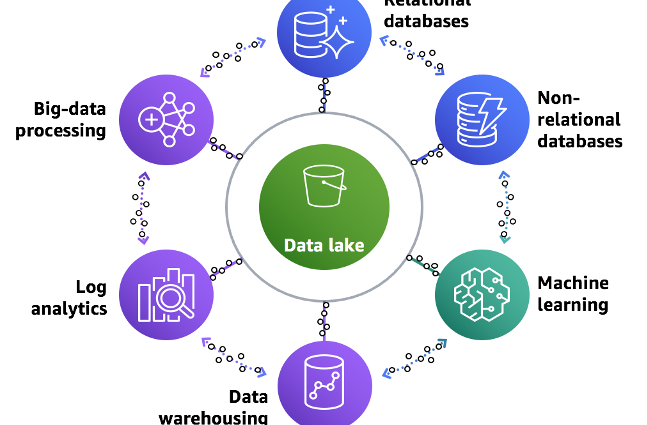
First, you have to start with what a data lake is and understand its function. A data lake can easily be called a storage facility. It is a curated, centralised, and secure repository storage that keeps all your unstructured and structured data, irrespective of the scale.
You can run several types of analytics to make a well-informed decision, from visualisations, big data processing, and dashboards to machine learning and real-time analytics.
What Kind Of Challenges Might You Face?
Next, you should be savvy about the challenges that come along the way. The primary block in data lake administration is from storing raw data without any content oversight. To make the data stored in your lake usable, you will need more defined mechanisms that help catalogue and secure it.
Lake Formation offers all the mechanisms required to implement semantic consistency, governance, and control. It will make the data more operational for machine learning and analytics. This, in turn, translates to better value for your business.
It also allows you to regulate who gets access to the data and evaluate who are. This is why making sure you are profound in dealing with any complications is absolutely necessary.
Steps to Create Data Lakes and What Your Need
To start with the process, you will need the following things beforehand:
- Your AWS account
- Any IAM user that has the AWSLakeFormationDataAdmin policy
- A new S3 bucket named datalake-yourname-region
- A zipcode folder inside the S3 bucket
Once that is gathered, you start setting up the S3 bucket and bringing the dataset. Now, follow the steps to create the data lake with Lake formation.
Step 1:
You should start by designating yourself as a data lake administrator. This will allow you all access to Lake Formation resources. After that, catalogue an Amazon S3 path where you will store your data inside the data lake.
Step 2:
With that done, you will have to develop a database inside the AWS Glue Data Catalogue to store the zip code table definitions. For the database, type in zipcode-db, your S3bucket, or Zipcode for Location, and deselect Grant All to Everyone for every new table you create.
Step 3:
Then you will have to grant all permissions in AWS Glue to allow access to zipcode-db. Choose your user AWSGlueServiceRoleDefault for the IAM role. With data location, you will also have to give access to the AWSServiceRoleForLakeFormationDataAccess and user permissions. And, for storage locations, type in s3://datalake-yourname-region.
Step 4:
Now you have to create the table and metadata. For that, you need to connect the crawler to the data store and run it through a list of classifiers, further determining your data schema. This will then create metadata tables for your AWS Glue Data Catalogue.
Step 6:
Now, all you have to do is grant access to others to manage your data on the AWS Glue Data Catalogue permissions. You can regulate that with the Lake Formation Console. Next, you have to query the data lake with Athena.
Step 7:
Finally, you have to learn how as a data lake administration, you can setup a new user with restricted access to columns. Go to the IAM console and create a new user with administrative rights. Rename the user and add the AWSLakeFormationDataAdmin policies.
With that, you are done. If you want to revise your skills and learn more about the same, you can try an AWS certified data analytics course from Trainocate.